What it is
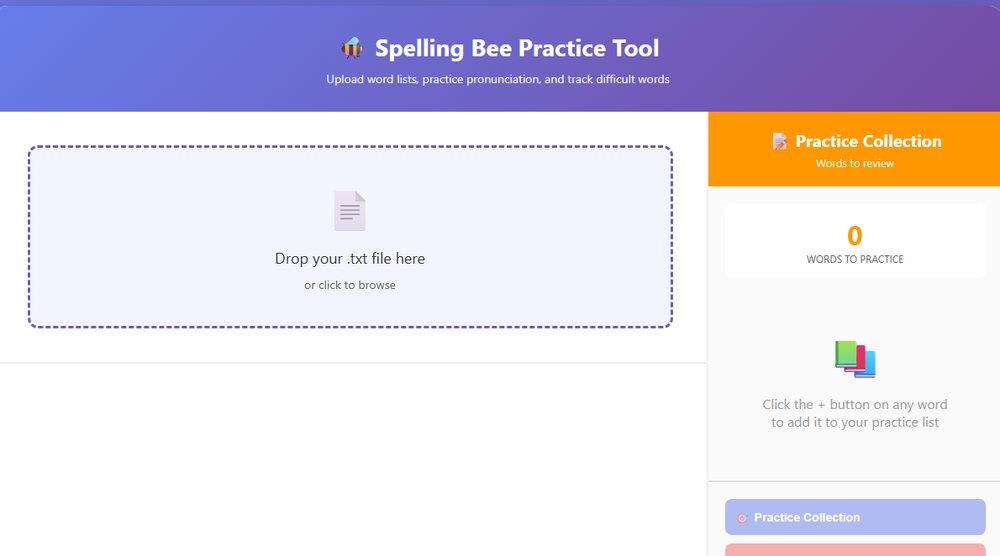
The Spelling Bee Practice Tool is a free, browser-based application that helps parents coach their children for spelling competitions without the stress of mispronouncing difficult words. Whether you are preparing for a school spelling bee, practicing weekly vocabulary lists, or building language skills, the tool acts as a personal pronunciation coach, speaking each word with clarity using professional American English text-to-speech.
Unlike flashcards or random practice, it ensures every word is pronounced correctly and consistently, giving your child the authentic spelling bee experience at home. No app downloads, no subscriptions, no complicated setup. Upload a word list and start practicing immediately.
Why parents like it
- Correct pronunciation every time. Stop second-guessing how to say "synecdoche" or "chiaroscuro." The tool uses text-to-speech with a standard American accent, so your child hears words exactly as they will be spoken in competition.
- Track difficult words instantly. When your child misspells a word, click the plus button to add it to the Practice Collection. No mental notes, no scrambling for paper.
- Flexible practice sessions. Play through an entire list, or click individual words for instant replay. Adjust the speaking speed to your child's pace. Practice 10 words before dinner or 100 on the weekend.
- Built for busy parents. No registration, no installation, no learning curve. Upload a text file and you are practicing in under 30 seconds, on a laptop, tablet, or phone.
- Reusable practice collections. Every difficult word becomes part of a focused review list you can practice repeatedly until it is mastered.
How to use it
Step 1: prepare your word list. Create a simple text file (.txt) with your spelling words, one per line or separated by spaces. Competition lists, weekly vocabulary from school, or your own custom lists all work. For example:
accommodate
rhythm
pneumonia
necessary
Step 2: upload your list. Click the upload area or drag your text file onto the tool. The words appear instantly as clickable tiles.
Step 3: start practicing. Click Play All to hear every word in sequence, or click any individual word to hear it pronounced. Use the speed slider to slow down or speed up. Pause and resume whenever you like.
Step 4: mark difficult words. When your child misspells a word, click the orange plus button next to it. It goes straight into the Practice Collection sidebar.
Step 5: review difficult words. Click Practice Collection to load only the words your child struggled with, for a focused session on exactly what needs work.
Step 6: repeat until mastered. Keep practicing the collection. Remove words as they are learned, or clear the list and start fresh with the next session.
Real-world uses
Weekly spelling tests. Instead of reading 20 words aloud every Sunday night (and possibly mispronouncing them), upload the week's list and let your child practice independently. They can replay difficult words as often as they need without asking you to repeat them.
Competition preparation. Regional spelling bee lists often contain 300 or more challenging words. Upload the entire list, practice in batches of 50, and use the Practice Collection to build a personalized "difficult words" list that shrinks as skills improve.
ESL and language learning. For families where English is not the first language, the tool ensures children hear correct American English pronunciation, and parents never have to worry about their own accent affecting their child's spelling.
Homeschool vocabulary. Homeschooling parents can create custom lists aligned with their curriculum. The tool becomes a consistent pronunciation standard across literature, science, history, wherever challenging terminology appears.
Key features at a glance
- Standard American accent. Professional female voice using US English pronunciation
- Instant upload. Works with any .txt file and processes lists in seconds
- Adjustable speed. Slow down for beginners, speed up for advanced practice
- Practice Collection. One-click tracking of difficult words
- Unlimited replays. Click any word to hear it again
- Works everywhere. Desktop, tablet, or phone, no app required
- Private. All processing happens in your browser, nothing is uploaded
- Free. No subscriptions, no ads, no hidden costs
Technical details for the curious
The tool runs entirely in your web browser using the Web Speech API, a built-in browser technology that converts text to speech. No data leaves your computer. The word list you upload is processed locally, so it works even without an internet connection after the initial page load. Compatible with Chrome, Edge, Safari, and Firefox on Windows, Mac, iOS, and Android.
Who this tool is for
- Parents preparing children for school or regional spelling bees
- Homeschool educators teaching vocabulary and spelling
- ESL families building English pronunciation skills
- Teachers creating at-home practice resources for students
- Tutors working with multiple students on spelling skills
- Any parent who wants to support their child's literacy without the stress